
Review Your Account Details
Your Account page gives you a quick way to confirm that you are signed in to the workspace you intended to use. Taking a moment to review these details can prevent work from being added under the wrong account.
Before You Start
Sign in to AlgoLedger. Never include your password, verification code, or payment information in a screenshot or Support request.
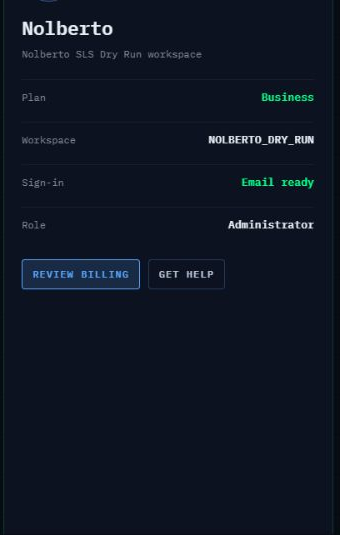
The Account page displays your workspace and access details for review. The values shown in your account will be different from this example.
Review Your Account Details
- Select Account from the left navigation.
- Confirm that the name at the top of the Account card is the identity you expect.
- Review the workspace name shown beneath the identity.
- Review Plan as the value displayed for this Account view. This label alone does not confirm billing or subscription status.
- Review Workspace and confirm that it is the workspace you intended to open.
- Review Sign-in and confirm that the displayed status matches your expected sign-in method.
- Review Role and confirm that it matches the access you expect to have.
- Stop if any displayed value appears incorrect. The observed Account view is read-only and does not provide an edit or Save control.
Confirm Success
Your review is complete when the displayed identity, workspace, sign-in status, and role match what you expect.
If Something Looks Wrong
Select GET HELP, or open Help / Support from the left navigation. Tell Support which label appears incorrect and what you expected to see. You may attach a redacted screenshot, but remove personal or sensitive information first.
The Account page also displays REVIEW BILLING. Use it only when you need to review billing information; this guide does not confirm where that action leads or what billing options will be available.
Need Help?
We want your account details to feel clear and trustworthy. If anything looks unfamiliar, contact Support before continuing. Include the name of the label that concerns you and a redacted screenshot if it helps. Do not send passwords, verification codes, or payment details.