
Review Trades Before Importing
Review every staged trade group before import so the correct trades reach the correct strategy only once.
Before You Start
Keep the source report open. Reviewing a staged file does not commit it to live trades.
Review the Staged Groups
- Confirm that the displayed file name matches the source report.
- Compare the source account and date range with the report.
- Confirm that the completed round-trip count is expected.
- Review each trade group's market, direction, quantity, entry time, and exit time.
- Confirm that each verified group is assigned to the intended strategy.
- Reassign a group only when you are certain of the correct strategy.
- Use MARK DO NOT IMPORT for any group that must stay out of live trades.
- Check the preview for duplicates, unmatched rows, blocked rows, or incomplete groups.
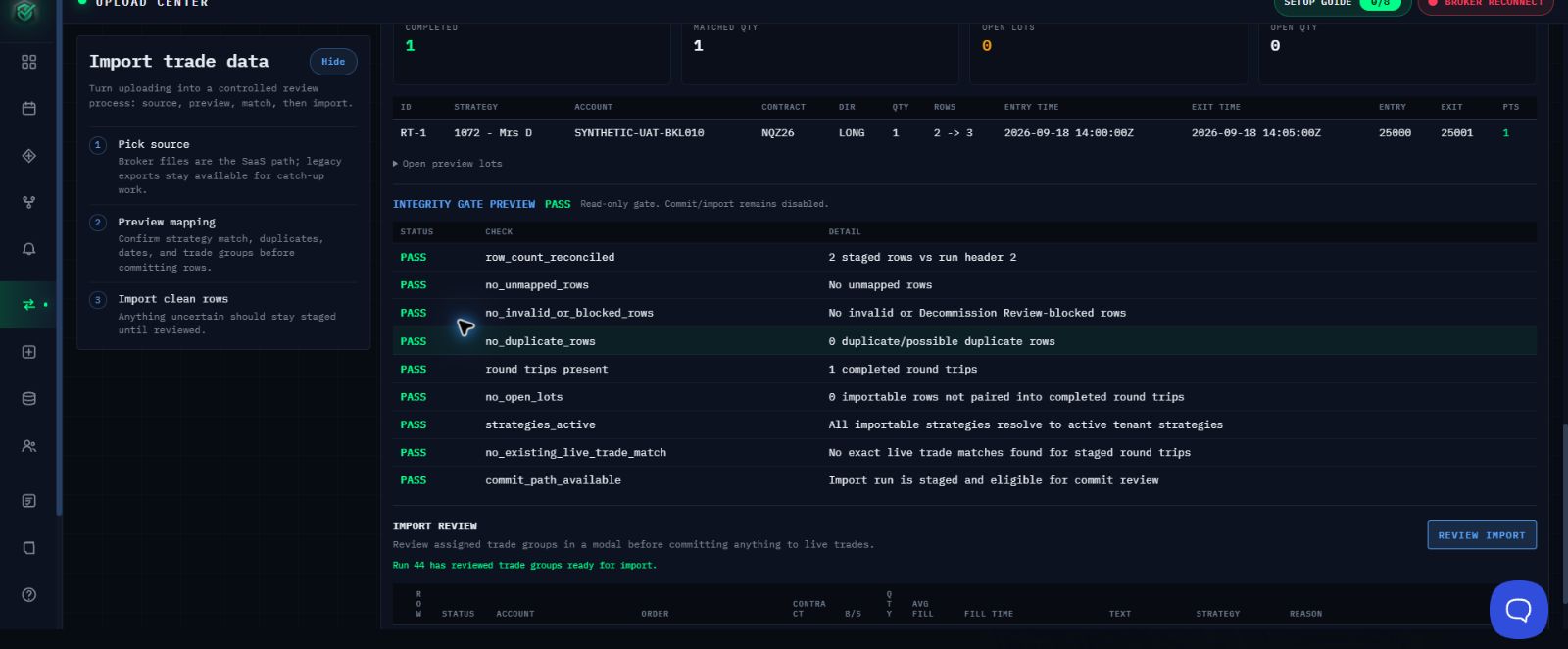
Figure 1. Continue only when every Integrity Gate Preview check shows PASS and Review Import is available.
- Confirm INTEGRITY GATE PREVIEW shows PASS for every check.
- Confirm the expected completed round-trip count again.
- Select REVIEW IMPORT.
- In the confirmation modal, approve only the trade groups you verified.
Confirm Success
After import, confirm the page shows COMMITTED with the expected trade count. Open the intended strategy and verify that the imported trades appear before leaving the page.
Stop and Correct the Preview
Do not continue when a count, date, account, strategy assignment, duplicate warning, unmatched row, blocked row, or integrity check is unclear. Leave the rows staged, correct the source or assignment, and review again. Do not submit the file again until you have checked whether the first import committed.
Need Help?
Contact support@mail.algoledger.io with the safe account label, file name, row count, and exact visible warning. We will help you review the staged result. Do not send credentials or authentication codes.